Formatting removable media throws “You do not have sufficient rights to perform this operation.”
I tried to format my camera SD-card and my windows comes up with the error: A little bit google helped: Starting management console as lokal administrator St...
I tried to format my camera SD-card and my windows comes up with the error:
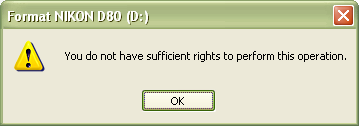
A little bit google helped:
Starting management console as lokal administrator Start | Run | Open: runas /user:<LokalAdmin> mmc.exe
Adding group policy snap-in File | Add/Remove Snap-In… | Add… | Group Policy Object Editor | Add | Finish | Close | OK
Browse to security policy
Console Root | Local Computer Policy | Computer Configuration | Windows Settings | Security Settings | Local Policies | Security Options
Pimp the privileges for non administrative users Open policy “Devices: Allowed to format and eject removable media” Set value to: “Administrators and Interactive Users” OK

After logging out and newly logging in formatting is possible.