Modern Collaboration in Software Engineering
Why modern software engineering teams favor collaboration platforms such as Microsoft Teams over email for internal communication, knowledge sharing, file collaboration, and faster decision-making.
Favor Teams over Email
Why email (often) sucks
Starting point: an email that had already been bounced back and forth between several colleagues before finally landing in the Outlook inbox of the author of this message
Every single message in the thread was bloated with:
- the header metadata stuff: from, when, to, cc, …
- The redundant corporate footer
btw: Why is this even added in many companies also internally? Do we really think colleagues need a reminder of the company they work for?
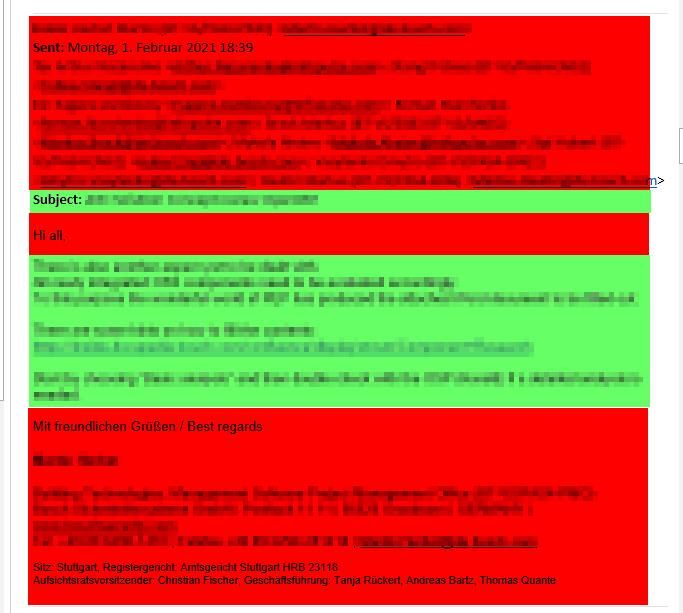
Just look at this example — only one email out of many in the chain:
- Only a tiny portion (highlighted in green) actually contains meaningful information
- The rest (in red) is noise that clutters the view and distracts from what matters
S/N (signal-to-noise ratio)? Around 1:3 or worse. For every bit of useful content, there’s twice as much junk. Seriously, WTF?!
In total, there were 20 emails, taking up 17 pages in the preview pane!!!
What kind of mood does that put you in? It feels like digital archaeology — nobody wants to dig through that mess.
That’s the reason for the success story of collaboration platforms like Slack and Teams. Communication is focused to the facts
.. with an S/N of 1:0
Swarm Intelligence
Have a look how the developers community in general prefers Teams over Email (ChatGPT assisted research):
Using Microsoft Teams over traditional email communication can offer several distinct advantages, particularly for collaboration, speed, and organization. Here’s a breakdown of why Teams is often considered better than emailing, along with some supporting resources:
Real-time Communication & Instant Messaging
- Instant replies: Teams allows for real-time chat, so you can have ongoing conversations, reducing wait time compared to emails which can take hours or even days to get a response.
- Group Chats: Team chats allow for multiple participants, making group communication easier than using multiple email threads.
Organized Channels & Threads
- Channels: Teams enables you to create specific channels for different topics, departments, or projects, keeping conversations on-topic and easy to follow.
- Threaded Conversations: Replies are threaded, making it clear what part of the conversation you’re responding to, unlike email chains which can get confusing.
- File Organization: All shared files are stored within the team space, and they stay organized and searchable by topic.
Integration with Other Tools
- Microsoft Ecosystem: Teams integrates seamlessly with other Microsoft Office tools (Word, Excel, PowerPoint), SharePoint, OneDrive, and Planner, allowing you to collaborate and work within the same environment.
- Third-Party Integrations: Teams also integrates with hundreds of third-party apps (like Trello, Asana, Jira, GitHub) to streamline work processes.
Resource: Apps and Integrations in Teams
File Sharing and Collaboration
- File Sharing: Teams allows for direct file sharing, which is quicker and more effective than attaching files to emails.
- Simultaneous Collaboration: Multiple team members can work on the same document in real-time, without the hassle of sending files back and forth as email attachments.
- Version Control: Teams keeps track of file versions, so you can easily revert to previous iterations without the need for emails with “revised” attachments.
Resource: Teams File Sharing - Microsoft Support
Video & Audio Calls
- Built-in Calls: Teams allows for quick video or audio calls with one click, which can be more effective for resolving issues or having a deeper discussion than emailing.
- Screen Sharing: You can share your screen during a call, which makes it easier to collaborate on documents or present ideas instantly.
Resource: How to Make Calls in Teams
Centralized Communication Hub
- Everything in One Place: Teams provides a central hub where you can chat, hold meetings, share files, and collaborate on projects, eliminating the need for juggling multiple email threads, calendars, and file-sharing platforms.
- Easy Notifications: Teams provides more streamlined notifications for mentions, messages, and updates, helping you stay on top of what’s happening without being buried in a flood of emails.
Resource: Teams as a Communication Hub
Better Organization and Searchability
- Search Functionality: Teams offers robust search capabilities, allowing you to search for specific messages, files, or conversations, which is far more efficient than sifting through old emails.
- Pinned Files & Messages: You can pin important files and messages within channels, making them easier to access.
Resource: Search and Organize in Teams
Reducing Inbox Clutter
- No Email Overload: Teams reduces the need for internal emails. This helps prevent inbox overload, which is common when emails are constantly exchanged for updates or team discussions.
- Faster Decision-Making: Since conversations happen in real time, decisions can be made much faster compared to the delay of waiting for an email response.
Resource: How to Reduce Email Clutter in Teams
Task & Project Management
- Task Assignments: Teams integrates with Microsoft Planner, enabling you to create and track tasks, deadlines, and priorities directly within the app.
- Tracking Progress: With features like Kanban boards and task lists, you can manage and track your project’s progress without sifting through multiple email threads.
Resource: Teams with Planner
Security & Compliance
- Enterprise-Grade Security: Microsoft Teams is built on Microsoft’s security infrastructure, offering robust protections like encryption, two-factor authentication, and advanced compliance tools for enterprise users.
- Data Retention Policies: You can set retention policies to automatically delete or archive messages and files to comply with organizational or legal requirements, which is harder to manage through email.
Resource: Teams Security and Compliance
Conclusion
While email is still essential for formal communication and external correspondence, Microsoft Teams offers superior benefits for internal collaboration, making it more efficient for teams that need real-time communication, better file-sharing, and seamless integrations.
For organizations looking to streamline collaboration, reduce clutter, and improve communication, adopting Teams can be a major productivity boost.