Trimming the Fat: A Cleanup Guide for .NET Project Files
A field guide to legacy .csproj elements — what's safe to delete, what SDK-style projects already handle, and a workflow for keeping project files lean over time.
If you’ve worked on a .NET codebase for more than a couple of years, you’ve almost certainly opened a .csproj file and been greeted by a wall of XML that nobody fully understands anymore. Elements copied from a template years ago, settings that match their defaults, and configuration blocks duplicated across Debug and Release — all quietly rotting in a file that’s supposed to be a simple project description.
It doesn’t have to stay that way. Here’s a practical look at where the clutter comes from and how to clean it up.
Where the duplication hides
Most legacy project files carry a PropertyGroup for at least two configurations, Release and Debug, and the two groups tend to be near-identical. In a typical example, only four lines actually differ between them — more than twenty others are copy-pasted verbatim.
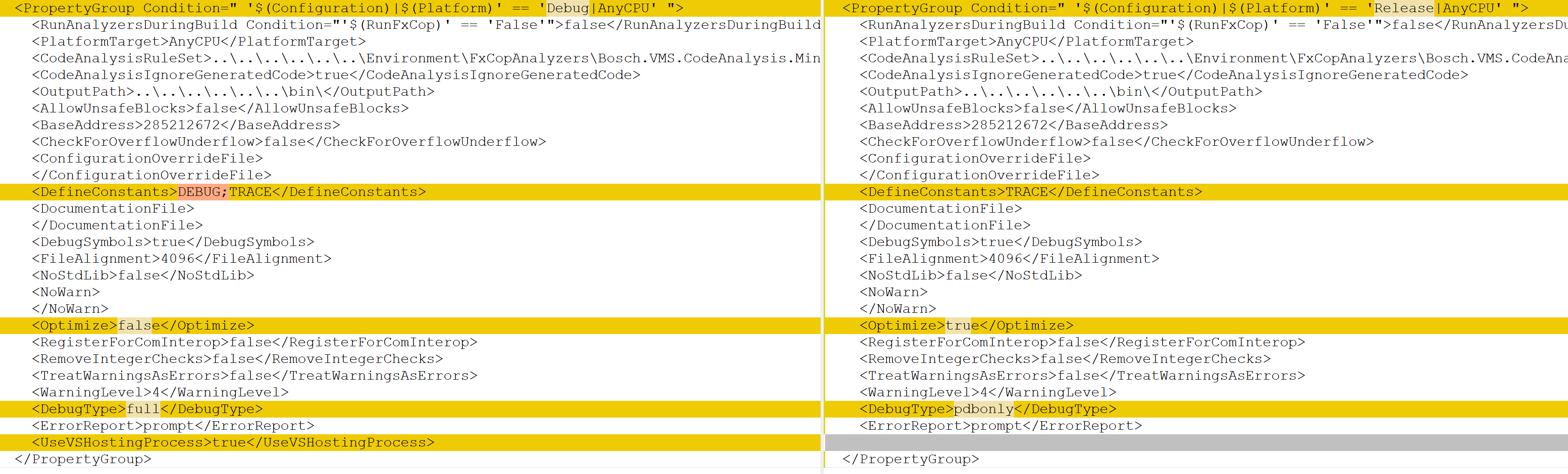
Anything that doesn’t depend on the build configuration belongs in the unconditioned PropertyGroup at the top of the file instead of being repeated in every configuration-specific block.
Beyond that, two more categories of clutter tend to build up over time:
- Elements set to their default value. They add noise without changing behavior and can be removed outright.
- Outdated elements. Settings that made sense under an old toolchain but have since been abandoned. Safe to delete.
A field guide to legacy elements
Modern SDK-style projects (<Project Sdk="Microsoft.NET.Sdk">) infer most of what older, verbose project files spelled out explicitly. Below is a quick reference for the elements you’re most likely to run into, what they do, and whether they still earn their place in a modern project file.
| Element | Purpose | Still necessary? |
|---|---|---|
<AllowUnsafeBlocks> | Enables unsafe code blocks | Only if the project uses unsafe code |
<AssemblyName> | Output assembly name | Usually not — defaults to the project file name |
<AssemblyOriginatorKeyFile> | Strong-name signing key path | Only if the assembly must be signed |
<BaseAddress> | Preferred DLL memory address | No — legacy, irrelevant under modern runtimes |
<CheckForOverflowUnderflow> | Enables arithmetic overflow checks | Optional |
<CodeAnalysisIgnoreGeneratedCode> | Skips generated code in static analysis | Optional |
<Configuration> | Build configuration name | No — belongs in the build pipeline |
<DebugSymbols> | Generates .pdb files | Optional |
<DelaySign> | Partial assembly signing | Only if required |
<ErrorReport> | Compiler internal error reporting | Largely obsolete |
<FileAlignment> | Byte alignment of output sections | No — managed automatically |
<NoStdLib> | Skip standard library reference | No |
<OutputType> | Library, Exe, etc. | Yes |
<Platform> | Target platform | Usually redundant next to <PlatformTarget> |
<PlatformTarget> | Target build architecture | Yes |
<ProjectGuid> | Unique project identifier | Legacy-only |
<ProjectType> | Project type marker | No |
<ProductVersion> | VS version metadata | No |
<RegisterForComInterop> | COM interop registration | Only if needed |
<RemoveIntegerChecks> | Removes overflow checks | No |
<RootNamespace> | Root namespace | Optional — defaults to project name |
<RunPostBuildEvent> | When post-build events run | Only if post-build events exist |
<SchemaVersion> | Project file schema version | No — legacy |
<SignAssembly> | Assembly signing toggle | Only if signing is required |
<TargetFrameworkVersion> | .NET Framework version | Yes, for non-SDK-style projects |
<TreatWarningsAsErrors> | Warnings as errors | Optional, but recommended for strictness |
<WarningLevel> | Compiler warning verbosity | Optional — defaults to 4 |
For SDK-style projects specifically, <BaseAddress>, <CodeAnalysisIgnoreGeneratedCode>, <ErrorReport>, <FileAlignment>, <NoStdLib>, <ProductVersion>, <SchemaVersion>, and <ProjectType> are all safe to delete.
Defaults vs. what’s actually in your file
A large share of the elements above show up in project files simply because a template author included them once — even though the value written down is exactly the framework default. A quick audit (comparing the specified value against the documented default for each element) usually reveals that most of a legacy project file could be deleted without changing behavior at all. The handful of exceptions worth keeping an eye on: <AssemblyName> and <RootNamespace> when they diverge from the project file name, and anything tied to assembly signing.
Why bother cleaning this up
It’s tempting to leave working project files alone — “if it builds, don’t touch it.” But redundant settings cost more than they look like they do:
- Readability suffers. New team members have to guess which of the twenty settings actually matter.
- Maintenance gets harder. Redundant or outdated settings cause confusion during upgrades and migrations, and occasionally conflict outright with newer tooling.
- Modern standards get bypassed. SDK-style projects were built specifically to minimize this kind of boilerplate — fighting that by keeping the old verbosity around defeats the purpose.
A practical cleanup workflow
Adopt SDK-style projects wherever feasible. A minimal SDK-style project can be as short as:
<Project Sdk="Microsoft.NET.Sdk">
  <PropertyGroup>
    <OutputType>Library</OutputType>
    <TargetFramework>net6.0</TargetFramework>
  </PropertyGroup>
</Project>
Keep only what genuinely differs from the default, and leave a comment when a non-standard setting exists for a non-obvious reason.
Automate what you can.
dotnet formatand ReSharper can both flag redundant or outdated elements.Commit cleanups separately from feature work, so the diff stays reviewable and the history stays clear.
Document the practice in your team’s coding standards, with examples of what’s normally kept and why.
There are legitimate reasons to keep “redundant” settings around — backward compatibility with older tooling, clarity for less experienced team members, or a deliberate temporary state during an experiment. The point isn’t to strip every project file to the bare minimum; it’s to make sure whatever remains is there on purpose.
Treat it as ongoing hygiene rather than a one-off chore: an initial pass to clear out the backlog, then periodic reviews — as part of code review or a quarterly check — to stop new clutter from accumulating again.