Working with Microsoft FxCop
Run FxCop as a post build event Since FxCop 1.36 it is possible to include FxCop in a post-build event. So FxCop runs after compiling in Visual Studio and al...
Run FxCop as a post build event
Since FxCop 1.36 it is possible to include FxCop in a post-build event.
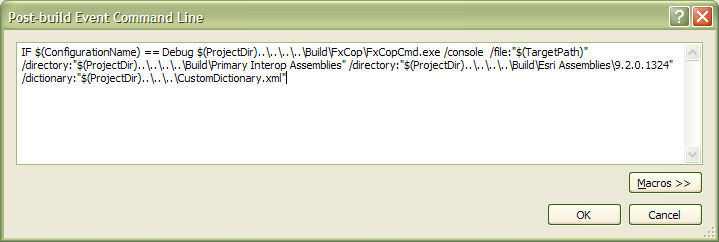
So FxCop runs after compiling in Visual Studio and allows you directly jumping to the warned line.

Description of the command line
In the sample above the command line is
IF $(ConfigurationName) == Debug $(ProjectDir)..\..\..\..\tools\FxCop\FxCopCmd.exe
/console
/file:"$(TargetPath)"
/directory:"$(ProjectDir)..\..\..\..\lib\Primary Interop Assemblies"
/directory:"$(ProjectDir)..\..\..\..\lib\ArcGIS\9.2.0.1324"
/dictionary:"$(ProjectDir)..\..\..\CustomDictionary.xml"
| Parameter | Description |
| /console | Outputs messages to console, including file and line number information. |
| /file | Assembly file to analyze. $(TargetPath) is a makro-variable of Visual Studio which points to the compilation. Wrap it in quotations to avoid problems with spaces in path names. |
| /directory | Location to search for assembly dependencies. This parametes could occurs multiple times. $(ProjectDir) is a makro-variable of Visual Studio which points to the *.csproj-file of the project. |
| /dictionary | Custom dictionary to allows own abbreviations and own words for syntax checking. |
Integration as a build target
Integration as an own target
Instead running FxCop as a post build event the using of build targets is a good and since using of Hudson the recommended way.
In the csproj file therefore a new target must included. You could name it De.Esri.FxCop.targets for instance.
Place the call of this target beneath the normal build target.
<Import Project="$(MSBuildToolsPath)\Microsoft.CSharp.targets" />

<Import Project="..\De.Esri.FxCop.targets" />
And now we need this target. Important is the FxCopCmd-call. Therefore we use the Exec tag.
The whole call must made in one line. Only for documentation purposes every option has a own line.
<Project xmlns="http://schemas.microsoft.com/developer/msbuild/2003">
<PropertyGroup>
<BuildDependsOn>$(BuildDependsOn);FxCop</BuildDependsOn>
<RebuildDependsOn>$(RebuildDependsOn);FxCop</RebuildDependsOn>
</PropertyGroup>
<ItemGroup>
<CodeAnalysisDictionary Include=""$(ProjectDir)..\FxCop.CustomDictionary.xml"" />
</ItemGroup>
<Target Name="FxCop">
<Exec Command="..\..\tools\FxCop\FxCopCmd.exe
/file:"$(TargetPath)"
/dictionary:"$(ProjectDir)..\FxCop.CustomDictionary.xml"
/out:"$(OutDir)..\$(ProjectName).FxCopReport.xml"
/console /forceoutput"
WorkingDirectory="..\..\tools\FxCop\" ></Exec>
<Message Text="FxCop finished." />
</Target>
</Project>
Because the filesystem ressource parameters could contain spaces (e.g. )Program Files) these parameters must be quoted. Thats why we need the cryptical " there.
Integration as a MSBuild-Community target
Complex build script run FxCop: