Calling esriRegasm manually (outside an ArcGIS-installation)
How to run esriRegasm outside an ArcGIS installation and on build/CI servers without ArcGIS, including the required permissions and MSBuild target changes.
Since ArcGIS 10 during the Visual Studio build an additional target with the execution of a program named esriRegasm is called. Amongst other things this program adds the COM-categories in the registry.
If you need to call this program outside a build at an own cmd-prompt you could often see some strange errors.
Having the right permissions
First at all you need administration permissions. This is for the registry-entries.
You could open an admin-cmd like:
Win + Rrunas /user:<AdminUser>> cmd
Attention: If you have a 64-bit system you must take the cmd.exe from %windir%\SysWOW64.
Then with right mouse button > Run as administrator you get the admin-cmd.
Otherwise this error is thrown (only if parameter /e is specified):
ESRIRegAsm::Register
  Command line: "C:\Projects\\_Esri2011\Workshop\bin\EsriDE.Samples.ContentFinder.LegacyAgdAdapter.dll" /p:Desktop /e

  Registry Capture On.
  Registering managed library...
  Registry Capture Off.
  Processing Registry Entries...
  Created configuration file: {84afc21e-7c0f-4fa6-8aad-0c02ef35ea9f}\_esride.samples.contentfinder.legacyagdadapter
  Copying configuration file to destination...

Operation Failed
00A49118

Press Enter to continue...
and a message pops up:
Registration failed.
Could not write to disk.
Run esriRegasm
Go to the directory with the esriRegasm-program.
for instance: cd c:\Program Files (x86)\Common Files\ArcGIS\bin
Execute the program with the full assembly-name and option /p:Desktop
for instance: esriRegasm.exe "C:\Projects\\_Esri2011\Workshop\bin\EsriDE.Samples.ContentFinder.LegacyAgdAdapter.dll" /p:Desktop
Run esriRegasm at a build or CI-server without ArcGIS-installation
For this scenario we copy the needed Esri-stuff to a folder beneath our project. In my case this folder is <project-root>\tools\Esri\
You need from c:\Program Files (x86)\Common Files\ArcGIS\bin the following files:
ESRIRegAsm.exeESRIRegAsm.exe.configDADFLib.dll
Put your commands in a batch and run this batch as a build-step.
Update 2011/05/13
It seems, that the batch was a wrong hint.
One correct variant, is to change the ESRIRegAsm-calls in the *.scproj files.
Originally there is (for new Addins):
<Import Project="$(MSBuildExtensionsPath)\ESRI\ESRI.ArcGIS.AddIns.targets" Condition="Exists('$(MSBuildExtensionsPath)\ESRI\ESRI.ArcGIS.AddIns.targets')" />
<Target Name="BeforeBuild">
</Target>

<Target Name="AfterBuild">
    <Warning Text="Unable to create .esriAddin; missing ESRI ArcGIS Add-in SDK component(s)." Condition="!Exists('$(MSBuildExtensionsPath)\ESRI\ESRI.ArcGIS.AddIns.targets')" />
</Target>
or (for “old style” components):
<Target Name="BeforeClean">
<Exec WorkingDirectory="$(CommonProgramFiles)\ArcGIS\bin" Command="esriRegasm.exe "$(TargetPath)" /p:Desktop /u /s" Condition="Exists('$(TargetPath)')" />
</Target>
<Target Name="AfterBuild">
<Exec WorkingDirectory="$(CommonProgramFiles)\ArcGIS\bin" Command="esriRegasm.exe "$(TargetPath)" /p:Desktop /s" />
</Target>
and you should change this to:
<Target Name="BeforeClean">
<Exec WorkingDirectory="$(SolutionDir)\.." Command="$(SolutionDir)\..\tools\Esri\esriRegasm.exe "$(TargetPath)" /p:Desktop /u /s" Condition="Exists('$(TargetPath)')" />
</Target>
<Target Name="AfterBuild">
<Exec WorkingDirectory="$(SolutionDir)\.." Command="$(SolutionDir)\..\tools\Esri\esriRegasm.exe "$(TargetPath)" /p:Desktop /s" />
</Target>
BTW: maybe a own target frees you from the complex line in the *.csproj. Maybe I will investigate this later.
Update 2011/05/16
Okay – some things are stranger than first thought. This update ends up with a folder structure and project settings to run the stuff
First at all my folder-structure
part of src-folder:
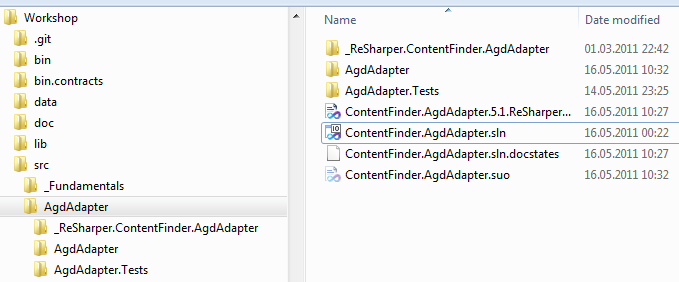
part of tools-folder:
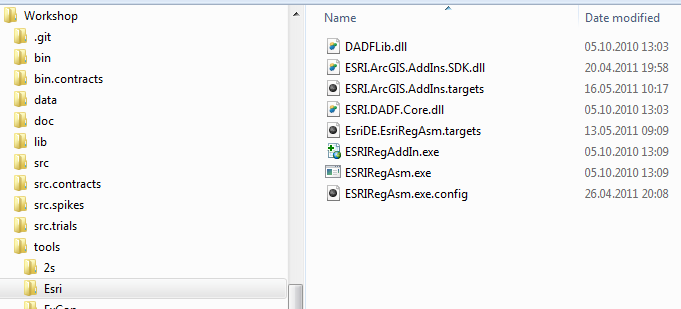
Next thing: we must edit the ESRI.ArcGIS.AddIns.targets file:
<!-- ORIGINAL ESRI -->
<!--
<Exec
IgnoreExitCode="true"
Condition="!Exists('Dont_EsriRegAddin.txt') And Exists('$(AddInFileToBeDeployed)')"
WorkingDirectory="$(CommonProgramFiles)\ArcGIS\bin"
Command="esriRegAddin.exe "$(AddInFileToBeDeployed)" /s">
<Output TaskParameter="ExitCode" PropertyName="ESRIRegAddinExitCode" />
</Exec>
-->
<!-- MARKO -->
<Exec
IgnoreExitCode="true"
Condition="!Exists('Dont_EsriRegAddin.txt') And Exists('$(AddInFileToBeDeployed)')"
WorkingDirectory="$(ProjectDir)\..\..\..\tools\Esri"
Command="esriRegAddin.exe "$(AddInFileToBeDeployed)" /s">
<Output TaskParameter="ExitCode" PropertyName="ESRIRegAddinExitCode" />
</Exec>
<!-- ORIGINAL ESRI -->
<!--
<Target Name="CleanArcGISAddin" Condition="Exists('$(ZipIntermediatePath)AddInID.txt')">
<!- get addin id and run ESRIRegAddin /u ->
<ReadLinesFromFile File="$(ZipIntermediatePath)AddInID.txt">
<Output TaskParameter="Lines" PropertyName="AddInCleanID" />
</ReadLinesFromFile>
<Exec IgnoreExitCode="true" WorkingDirectory="$(CommonProgramFiles)\ArcGIS\bin" Command="esriRegAddin.exe "$(AddInCleanID)" /u /s" />
<Delete Files="$(ZipIntermediatePath)AddInID.txt" />
</Target>
-->
<!-- MARKO -->
<Target Name="CleanArcGISAddin" Condition="Exists('$(ZipIntermediatePath)AddInID.txt')">
<!-- get addin id and run ESRIRegAddin /u -->
<ReadLinesFromFile File="$(ZipIntermediatePath)AddInID.txt">
<Output TaskParameter="Lines" PropertyName="AddInCleanID" />
</ReadLinesFromFile>
<Exec
IgnoreExitCode="true"
WorkingDirectory="$(ProjectDir)\..\..\..\tools\Esri"
Command="esriRegAddin.exe "$(AddInCleanID)" /u /s" />
<Delete Files="$(ZipIntermediatePath)AddInID.txt" />
</Target>
and also the *.csproj of the Add-in:
<!-- ORIGINAL ESRI -->
<!--
<Import Project="$(MSBuildExtensionsPath)\ESRI\ESRI.ArcGIS.AddIns.targets" Condition="Exists('$(MSBuildExtensionsPath)\ESRI\ESRI.ArcGIS.AddIns.targets')" />
-->

<!-- MARKO -->
<Import
	Project="$(ProjectDir)\..\..\..\tools\Esri\ESRI.ArcGIS.AddIns.targets"
	Condition="Exists('$(ProjectDir)\..\..\..\tools\Esri\ESRI.ArcGIS.AddIns.targets')" />
<Target Name="AfterBuild">
	<!-- ORIGINAL ESRI -->
	<!-- Gives build warning when add-in targets file is not found. -->
	<!--
	<Warning Text="Unable to create .esriAddin; missing ESRI ArcGIS Add-in SDK component(s)." Condition="!Exists('$(MSBuildExtensionsPath)\ESRI\ESRI.ArcGIS.AddIns.targets')" />
	-->

	<!-- MARKO -->
	<Warning
		Text="Unable to create .esriAddin; missing ESRI ArcGIS Add-in SDK component(s)."
		Condition="!Exists('$(ProjectDir)\..\..\..\tools\Esri\ESRI.ArcGIS.AddIns.targets')" />
</Target>
Here you could have a look at the stuff: