"Failure has occurred while loading a type."
Troubleshooting the .NET error 'Failure has occurred while loading a type' in a COM+ assembly, tracing it to stale registry permissions and resolving it by removing the problematic CLSID keys and running Visual Studio with administrative privileges.
Motivation
During programming suddenly this error (Failure has occurred while loading a type) was thrown by accessing a artifact of a referenced library.
In such cases I take the assembly fusion logger fuslogvw to search for problems of loading assemblies. Sometimes an old version from a not expected folder is binded. But all bindings were correct.
Problem
After several hour I got the right hint. Because the assembly is a COM+ one, there are some registration things in die background – and I don’t mean the regsrv-stuff!
And there was one step which access the GUID of the type under HKEY\_CLASSES\_ROOT\Wow6432Node\CLSID\{4E83E98D-0D8F-4949-8436-0F001CFE5039}.
Reason for the problem
Than I remembered, that I started developing of the COM+ library as a normal user – and during runtime I got two errors regarding the accessing of the following keys:
System.EnterpriseServices.RegistrationException : You must have administrative credentials to perform this task. Contact your system administrator for assistance.
----> System.EnterpriseServices.RegistrationException : Failed to register assembly 'ErpUnlinkedObjectsRestSoe, Version=1.0.0.0, Culture=neutral, PublicKeyToken=0123456789abcdef'.
----> System.UnauthorizedAccessException : Access to the registry key 'HKEY\_CLASSES\_ROOT\ErpUnlinkedObjectsRestSoe' is denied.
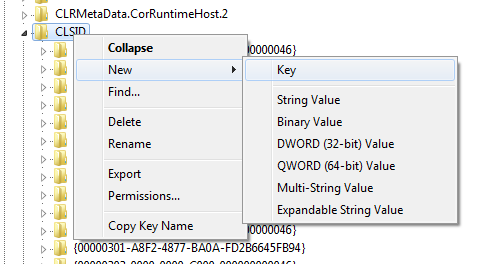
I created this key with administrative credentials:
and set the permissions for normal users:
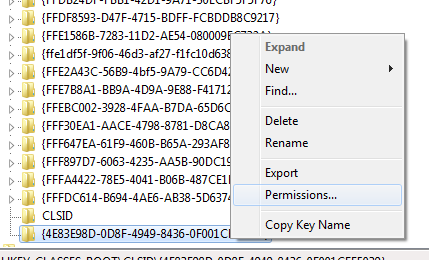
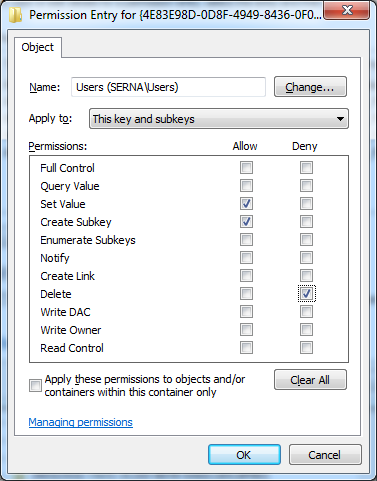
Because after each run the key is deleted I decided to set a deny for delete. So the key stays over the following runs.
The following error
System.EnterpriseServices.RegistrationException : You must have administrative credentials to perform this task. Contact your system administrator for assistance.
----> System.EnterpriseServices.RegistrationException : Failed to register assembly 'ErpUnlinkedObjectsRestSoe, Version=1.0.0.0, Culture=neutral, PublicKeyToken=0123456789abcdef'.
----> System.UnauthorizedAccessException : Access to the registry key 'HKEY\_CLASSES\_ROOT\CLSID\{4E83E98D-0D8F-4949-8436-0F001CFE5039}' is denied.
I resolved like above.
And these keys were now the basic evil.
Solution
I deleted the key and started my Visual Studio with administrative credentials to run the code.