Forwarding a Custom Domain to GitHub Pages
Why the blog moved from Geeks With Blogs to a Markdown and Git based workflow on GitHub Pages, and how to forward a custom GoDaddy domain to it via A records and a CNAME entry.
This blog post explains the intention of using GitHub Pages to host my own blog content. It also describes how to configure a new GoDaddy domain to have a nice entry point into this blog.
Motivation
Over several years I’ve blogged via Geeks With Blogs. But the more I maintained an internal wiki for my development team, the more it felt wrong to write content with a WYSIWYG editor. I came to love Markdown and Git-based repositories.
Additionally the question came up: “Why write for another provider instead of myself?”
Therefore it was clear that it was necessary to move my blog away and switch to a toolchain with Markdown and Git.
GitHub Pages
Overview
Initially the blog should have been hosted on one of my existing domains with vServer infrastructure in the background.
But that step was too big because of the additional familiarization with Git on the hosting side that would be necessary.
That will be investigated somewhere in the future.
So for the first phase it is good enough to use GitHub Pages to host my static content.
Prepare the blog
To use GitHub Pages as a provider for your own blog content, it is necessary to create a Git repository for it. Yes, only a Git repository holding the blog content as static web pages is necessary to serve the content.
Create a new repository and name it
<your-user-name>.github.io. That’s all. Now you have a base to start.Check the state of your GitHub page in a browser with
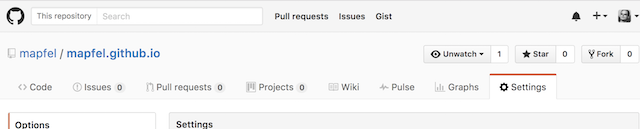
http://<your-user-name>.github.com.Go to the settings of that repository.
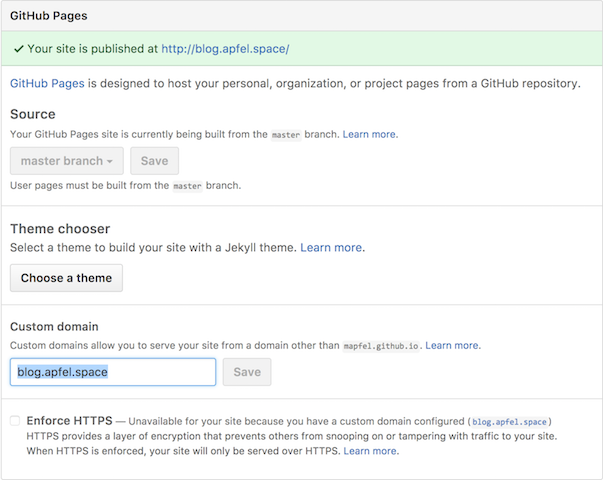
Define your custom domain.
GoDaddy
In the meantime a new domain apfel.space is used as an entry point to my hosted content. A .space domain is very cheap - only $15 for two years. So it’s a good deal: pay some bucks and avoid side effects for existing stuff.
Configure new domain
After ordering the new domain you have to configure a forwarding to your GitHub page from your new domain.
Unfortunately I was not able to switch the UI language to English. So the screenshots have German texts. (a ticket was created with GoDaddy).
Select the domain to configure.
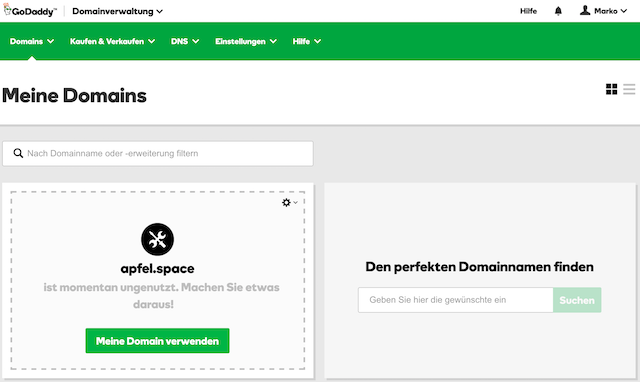
Connect it with an already existing web site (your GitHub Page).

Configure two
A recordentries to point to the IP addresses of GitHub Pages (192.30.252.153and192.30.252.154) and the CNAME forblogto point to the address of your GitHub page (http://<your-user-name>.github.com).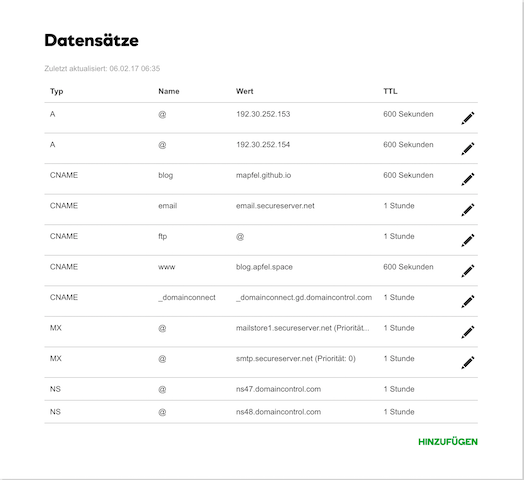
Wait a while (up to 1h) to get the updates populated.