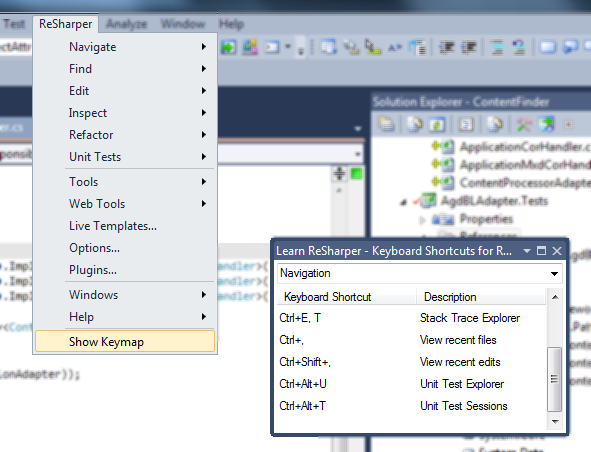
Get Keymaps for ReSharper running
How to get the Keymaps for ReSharper plugin working with ReSharper 5.1 by moving its DLL to the correct version-specific plugin directory.
Keymaps for ReSharper is a nice tool and allows the user easily to learn short cuts of ReSharper.
Unfortunately, the last update is from january 2010. So the installation folder of the installing script (Install.Keymaps.for.ReSharper.cmd) is not up to date. If you run it no expected new menu item “Show Keymap” under the ReSharper-menu is listed.
But you could easily correct this. Look in the cmd and you will see that the destination of the copy command inside points to
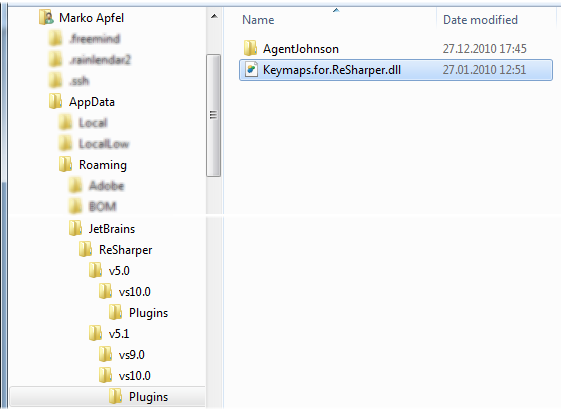
%APPDATA%\JetBrains\ReSharper\v5.0\vs10.0\Plugins
But on my machine is ReSharper 5.1 – so the Plugin folder is now on
%APPDATA%\JetBrains\ReSharper\v5.1\vs10.0\Plugins
Move the Keymaps.for.ReSharper.dll from the old location to the new one:
and everything works fine: