Installing Citrix XenServer from bootable USB stick
How to install XenServer 6.2 on an Intel NUC from USB stick, troubleshooting failures with UNetbootin and YUMI and successfully creating the installer with Rufus.
Installing XenServer 6.2 to my new Intel NUC was not so straight forward as thought.
The downloaded ISO (XenServer-6.2.0-install-cd.iso) I burned on my MacBook with Unetbootin onto a USB stick. Unfortunately this stick was not boot-able at all. Not in the NUC and also not on the MacBook.
So I switched to my “Standby-Windows” on Bootcamp and made the next attempt with YUMI. Now XenServer booted but a few installation steps later it hanged with failed to load com32 file mboot.c32. There are some advices in the web to fix such errors by replacing that file with one from a running installation. Too complex for my aim.
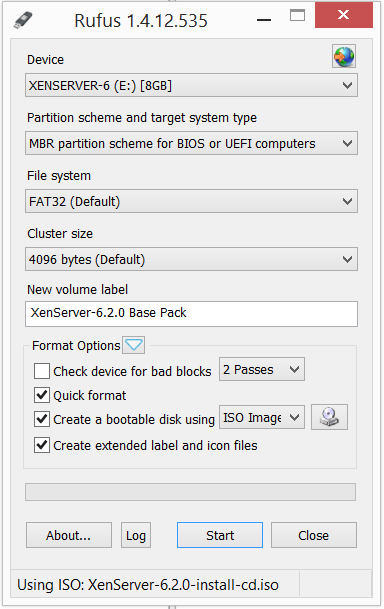
But one of the hints gave me the idea, that another burning program can fix that issue. Under www.pendrivelinux.com are some more burning tools listed and I gave Rufus a try. And bingo! – that burner created a boot-able USB stick which let me complete the installation.
I used these parameters: