MSB4067: The element <ImportGroup> beneath element <Project> is unrecognized.
Troubleshooting a Jenkins MSBuild failure caused by using the .NET 3.5 MSBuild version with the ImportGroup element, which requires MSBuild 4.0, despite targeting .NET Framework 3.5.
Problem
Our global Jenkins continuous integration server throws this error during compile step. My local TeamCity continuous integration server runs fine. What is the difference.
Background
I integrate some static code analysis steps via MSBuild-targets in the csproj files.
To allow a fast developing without a code analysis for ever compiling I bound these targets only to RELEASE-configuration.
With the MSBuild element <ImportGroup> only one condition must be specified. So my construct was:
<ImportGroup Condition="'$(Configuration)'=='Release'">
    <Import Project="..\..\..\tools\Fxcop\EsriDE.FxCop.targets" />
    <Import Project="..\..\..\tools\StyleCop\StyleCop.targets" />
</ImportGroup>
That works fine in Visual Studio and TeamCity.
But Jenkins allows to specify the MSBuild version:
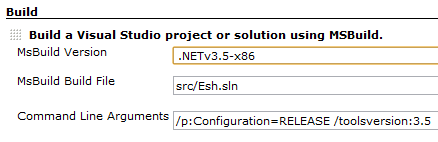
Because my target framework is .NET 3.5 I decide to choose the entry .NETv3.5-x86.
And this was the failure. The MSBuild element <ImportGroup> is new in .NET 4.0
Solution
With the following options everything runs fine:
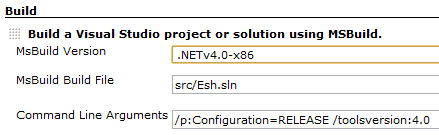
BTW: Maybe that some combinations of MSBuild version and toolsversion switch could also fix this error.