Multilanguage with C#
How to localize C# applications with .NET resource files, satellite assemblies, ResGen.exe, AL.exe, and a post-build process for multiple languages.
The .NET-Frameworks offers a good support for application which needs to be localizable. For each of my C#-projects i create three resources under the properties-folder.
| Resource | Description |
|---|---|
Images.resx | contains images for the application (mostly not needed to be localized, only for simple resource-access) |
Messages.resx | contains strings of messages for users (such as contents of MessageBoxes) |
Resources.resx | (normally created from VS by default) contains GUI-relevant stuff (such as label- and button-texts) |
For this example we use a simple message text in Messages.resx. The name of the localizable message text is MsgSampleText.

In the code this text can easily accessed:
   1: string messageText = Messages.MsgSampleText;
   2: MessageBox.Show(messageText);
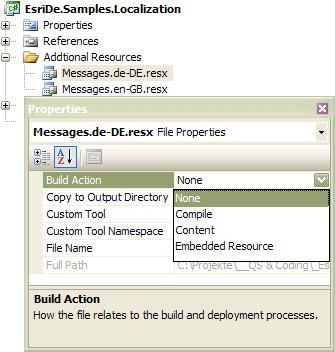
To organize resources for additional languages a new folder Additional Resources is used. In this folder I create the resources files for other languages (in this sample we use en-GB- and de-DE-language support). In the filename I encode the purpose. So we have now
- Messages.de-DE.resx
- Messages.en-GB.resx
Both of these resources should not be an embedded resource. So this must be changed to None
For each resource a so-called satellite assembly must be build. For that two steps we need:
- compile the resource with
ResGen.exe - link this resource in the satellite assembly with
AL.exe
For efficiency this is done by a post-build which calls a batch named CreateSatelliteAssemblies.bat under the folder Additional Resources.
   1: ECHO PARAMETER1=%1
   2: ECHO PARAMETER2=%2
   3:
   4: REM en-GB
   5: CD %2
   6: IF NOT EXIST en-GB mkdir en-GB
   7: CD en-GB
   8:
   9: "%ProgramFiles%\Microsoft SDKs\Windows\v6.0A\bin\RESGEN.EXE" %1\Messages.en-GB.resx
  10: "%ProgramFiles%\Microsoft SDKs\Windows\v6.0A\bin\AL.EXE" /t:lib /embed:%1\Messages.en-GB.resources,EsriDe.Samples.Localization.Properties.Messages.en-GB.resources /culture:en-GB /out:EsriDe.Samples.Localization.resources.dll
  11:
  12: REM de-DE
  13: CD %2
  14: IF NOT EXIST de-DE mkdir de-DE
  15: CD de-DE
  16:
  17: "%ProgramFiles%\Microsoft SDKs\Windows\v6.0A\bin\RESGEN.EXE" %1\Messages.de-DE.resx
  18: "%ProgramFiles%\Microsoft SDKs\Windows\v6.0A\bin\AL.EXE" /t:lib /embed:%1\Messages.de-DE.resources,EsriDe.Samples.Localization.Properties.Messages.de-DE.resources /culture:de-DE /out:EsriDe.Samples.Localization.resources.dll
And the post build for calling the batch and injecting the parameters %1 and %2 is:
1: "$(ProjectDir)Additional Resources\CreateSatelliteAssemblies.bat" "$(ProjectDir)Additional Resources" "$(TargetDir)"
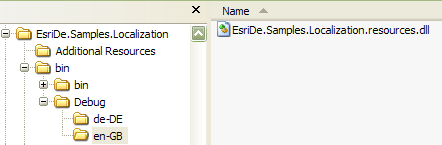
After compiling the application there should the following folder-structure which contains the satellite assemblies
Henceforth the resource-manager use the satellite assembly which fits to the language environment. And if no know language environement is used the default language included in the main assembly is used.
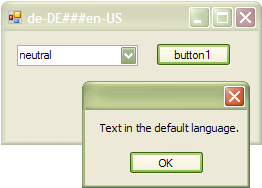
Screenshots